
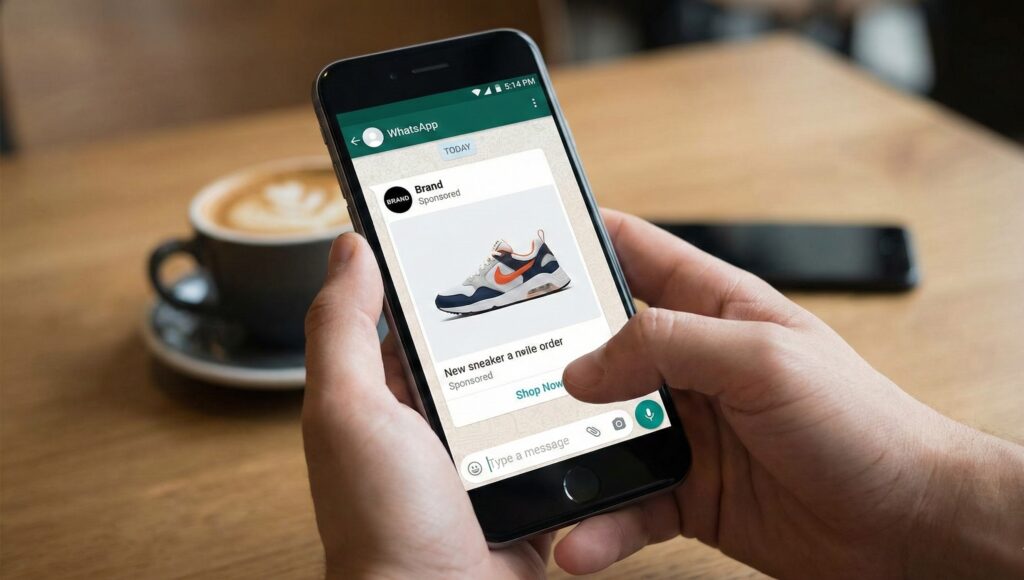
The Revolution of WhatsApp Ads in 2026: The Ultimate Guide for Businesses
In 2026, the digital marketing world has undergone a massive change. We no longer just “post and pray.” Instead, we talk. WhatsApp ads have become the single most powerful way for businesses to connect with people because that is where everyone is actually spending their time.
If you are still sending people to a slow-loading website, you are losing money. This guide is your complete roadmap to mastering WhatsApp ads in 2026. I will show you how to set them up, why they work, and the secret tricks the pros use to get a 10x return on their ad spend.
What Exactly Are WhatsApp Ads in 2026?
When we talk about WhatsApp ads today, we aren’t just talking about a button on a Facebook post. In 2026, WhatsApp has opened up its own “real estate” for ads.
1. Click-to-WhatsApp Ads (The Foundation)
These are ads that appear on Facebook and Instagram. Instead of a “Learn More” button that opens a browser, there is a “Send Message” button. One tap, and the user is inside a chat with your business. This is the fastest way to get a lead because you get their name and phone number the moment they say “Hi.”
2. Ads in the “Updates” Tab (The New Frontier)
This is the big update for 2026. You can now see sponsored content right between your friends’ Status updates.
-
Native Feel: They look just like a regular Status.
-
Discovery Mindset: People look at the Updates tab when they are bored and looking for something new. This is the perfect time to show them a cool product.
3. Promoted Channels
WhatsApp Channels have exploded. Now, businesses can pay to be at the top of the “Find Channels” list. If you have a brand that shares daily tips or deals, this is how you build a massive, loyal audience without ever needing an email list.
Why You Must Switch to WhatsApp Ads Right Now
If you are wondering why you should move your budget from Google or regular Facebook ads to WhatsApp, here are the simple facts:
-
98% Open Rates: Compare this to the 20% you get with email. People check WhatsApp 20 to 30 times a day.
-
Zero Friction: There is no “landing page” to wait for. No forms to fill out. The conversation is the conversion.
-
Instant Trust: Chatting feels personal. It feels like talking to a friend. When a customer can ask a question and get an instant answer, they are 70% more likely to buy.
Step-by-Step Guide for WhatsApp Ads in 2026: Setting Up Your First Campaign
Running an ad in 2026 is easier than ever because of Meta’s No-Touch AI. Follow these steps to get your first ad live today.
Step 1: Connect Your Business
You cannot use a personal WhatsApp for this. You need the WhatsApp Business App or the WhatsApp Business API.
-
Go to your Facebook Page Settings.
-
Click on Linked Accounts.
-
Select WhatsApp and follow the steps to verify your number.
Step 2: Create the Campaign in Ads Manager
Don’t use the “Boost” button. It’s a waste of money. Go to the professional Meta Ads Manager.
-
Objective: Select Engagement. This tells Meta you want people to talk to you.
-
Destination: Choose Messaging Apps and then check only the WhatsApp box.
Step 3: Let the AI Take the Wheel (Advantage+)
In 2026, we don’t spend hours picking interests like “people who like pizza.” We use Advantage+ Audience.
-
You just pick the Location and Age.
-
The AI looks at your image and text and “finds” the right people for you. It is much smarter than we are.
Step 4: The “Welcome Message” Secret
This is where most people fail. When someone clicks your ad, they shouldn’t just see a blank screen.
-
Set up Greeting Questions.
-
Instead of making them type, give them buttons: “I want to see the catalog,” “What are the shipping costs?”, “Talk to a human.”
WhatsApp Business App vs. API: Which One is for You?
This is a question I get every day. The answer depends on the size of your business.
The WhatsApp Business App (For Small Shops)
-
Cost: Free.
-
Best for: Local shops, bakers, or solo consultants.
-
Pros: Easy to use, works on your phone.
-
Cons: You can only handle so many chats before you get overwhelmed.
The WhatsApp Business API (For Growing Brands)
-
Cost: Paid (per conversation).
-
Best for: E-commerce, Real Estate, and anyone with a team.
-
Pros: You can have 10 people answering messages at once. You can use AI Chatbots to answer questions at 3 AM.
-
Cons: Needs a bit of setup.
| Feature | Business App | Business API (WABA) |
| Price | Free | Paid per chat |
| Team Access | Limited | Unlimited |
| Chatbots | Basic auto-reply | Advanced AI agents |
| Broadcasts | 256 people | 100,000+ people |
The AI Revolution: “No-Touch” Campaigns in 2026
We are now living in the era of No-Touch Ads. This means you provide the “What” and Meta handles the “How.”
1. AI Creative Tools
You don’t need a designer anymore. In the Ads Manager, you can upload a photo of your product, and the AI will:
-
Change the background to something trendy.
-
Write 5 different headlines that “hook” people.
-
Create a 10-second video from your photo.
2. Real-Time Optimization
The AI knows when people are most active on WhatsApp. It will spend more of your budget at 8 PM if that’s when your customers are chatting, and save your money during the slow morning hours.
Industry-Specific Strategies for 2026
1. Real Estate: The “Instant Tour” Strategy
Instead of asking people to “Register for a Call,” show them a video of the property. The CTA should be: “Message me for the floor plan.” People will click that in a heartbeat because they get the info immediately.
2. E-commerce: The “Cart Recovery” Bot
If someone adds an item to their cart on your site but doesn’t buy, send them a WhatsApp message 15 minutes later with a 10% discount code. This has a conversion rate of over 40% in 2026.
3. Education/Coaching: The “Free Consultation” Button
Use an ad to offer a free 5-minute chat. Once they are in the chat, your AI bot can qualify them by asking 3 simple questions before a human takes over.
The Golden Rules of WhatsApp Ads (Don’t Get Banned!)
WhatsApp is very strict about spam. If you annoy people, they will block you, and Meta will shut down your account.
-
The 24-Hour Rule: On the API, you can only send free-form messages if the customer has messaged you in the last 24 hours. After that, you must use an Approved Template.
-
Be Human: Don’t sound like a robot. Use emojis. Use voice notes. Use videos. People are on WhatsApp to talk to people, not corporations.
-
Speed is King: If you take 2 hours to reply, the customer has already moved on to your competitor. Use Quick Replies to answer the basics instantly.
How to Scale Your WhatsApp Ads 2026
Once you see that your ads are making money, how do you go bigger?
-
Retargeting: Show a second ad only to people who chatted with you but didn’t buy. Remind them why they liked your product.
-
Click-to-WhatsApp to Channel: Instead of a direct sale, send them to your WhatsApp Channel. This lets you market to them for free for the rest of their lives.
-
Lookalike Audiences: Tell Meta to find more people who look like the ones who are already chatting with you.
Conclusion: The Future is Conversational
The era of the “faceless” brand is over. In 2026, customers want to know who they are buying from. WhatsApp ads give you the bridge to build that relationship.
Whether you are a small business owner or a marketing manager for a big brand, the strategy is the same: Stop selling and start chatting. The sales will follow naturally.